1. Purpose and validity of the methodology
- Design responsibility: Test Manager in collaboration with DevOps and infrastructure team.
- Responsibility for execution: A system engineer or technical tester with appropriate authorizations to manipulate the infrastructure.
- Test Validity Criteria: Any DRHA test that does not contain a Background Load definition and a Failback procedure is considered invalid and must not be run on shared environments.
2. Key principles of DRHA testing
The design of each DRHA test case must strictly respect the following rules:
- Exact definition of SLA metrics: The test must measure and evaluate two basic values:
- RTO (Recovery Time Objective): The maximum acceptable downtime of the system (e.g., < 10 seconds for an HA cluster).
- RPO (Recovery Point Objective): The maximum acceptable data loss (e.g. 0 lost transactions).
- Background Load: Simulation of an outage must not take place on an idle system. The failover mechanism must be validated under the continuous load generated by the automated script.
- Deterministic method of destruction (Failure Injection): The method of invoking a crash must be precisely described at the level of commands (e.g. kill process, discarding packets via iptables, hardware shutdown) in order for the test to be fully reproducible.
- Required Failback: A successful failback is only half of the test. The methodology requires verification of secure data resynchronization and return of traffic to the primary node.
3. Standardized DRHA Test Case Template
The following structure is a mandatory template for creating DRHA test cases in the central test management tool. Each step must be precisely specified.
1. Test Identification and SLA Limits (Test Objective)
- Test type: e.g. High Availability – Loss of primary database node
- Target RTO: e.g. < 15 seconds
- Target RPO: e.g. 0 lost records
- Target component: e.g. Oracle DB Cluster – Node A
2. Prerequisites and Baseline & Load
- Verify that all cluster nodes are reporting a HEALTHY status (verification of status icons directly in Zabbix).
- Run a load script sending constant traffic (e.g., 50 INSERT requests per second).
- Wait 2 minutes for the network flow to stabilize.
3. Failure Injection
- Log in to the primary node (Node A).
- Simulate an instantaneous loss of network connectivity with the command:
sudo iptables -A INPUT -p tcp --dport [PORT] -j DROP - Record the exact time (Timestamp) of the execution of the command.
4. Failover Validation
- Availability analysis: The load script detects temporary connection errors. Traffic must automatically resume within the specified RTO limit.
- Metric verification: Analysis of the application server logs in OpenSearch confirms that no more timeouts and lost transactions are recorded after the RTO limit expires (RPO meeting = 0).
- Infrastructure state: Node B automatically assumes the MASTER role.
5. Failback Procedure
- Reset the network layer on Node A with the command:
sudo iptables -D INPUT -p tcp --dport [PORT] -j DROP - Verify that Node A connects back to the cluster as a SLAVE and successfully synchronizes delta data.
- Perform manual/automated Failback and verify the return of the MASTER role to the primary Node A.
4. Evaluation and reporting process
After the execution is completed, it is necessary to attach evidence (Evidence) to the test run. It is required to attach graphs or exports from monitoring tools that visually demonstrate the duration of the outage and confirm the successful resynchronization of data after a Failback. A test that demonstrates a functional switch but violates the RTO timeout must be classified as FAILED.
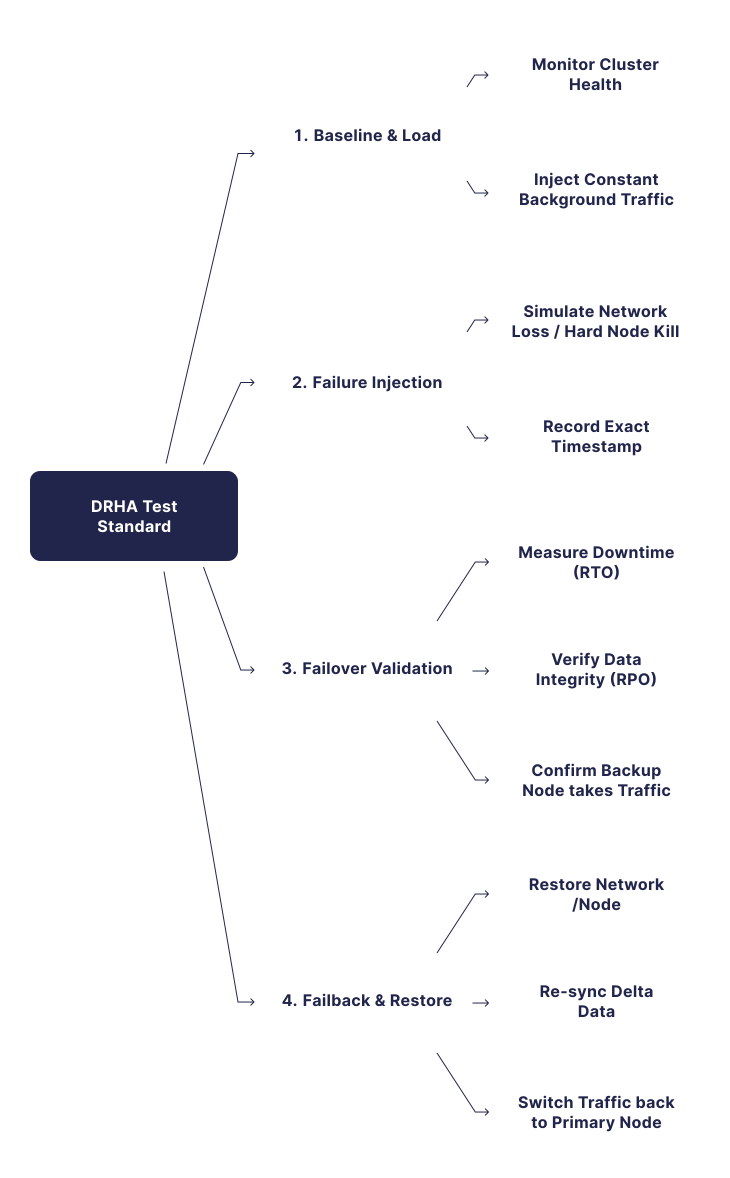
Visual diagram: DRHA test template lifecycle
The following diagram shows the process stages of the DRHA test according to the prescribed methodology.