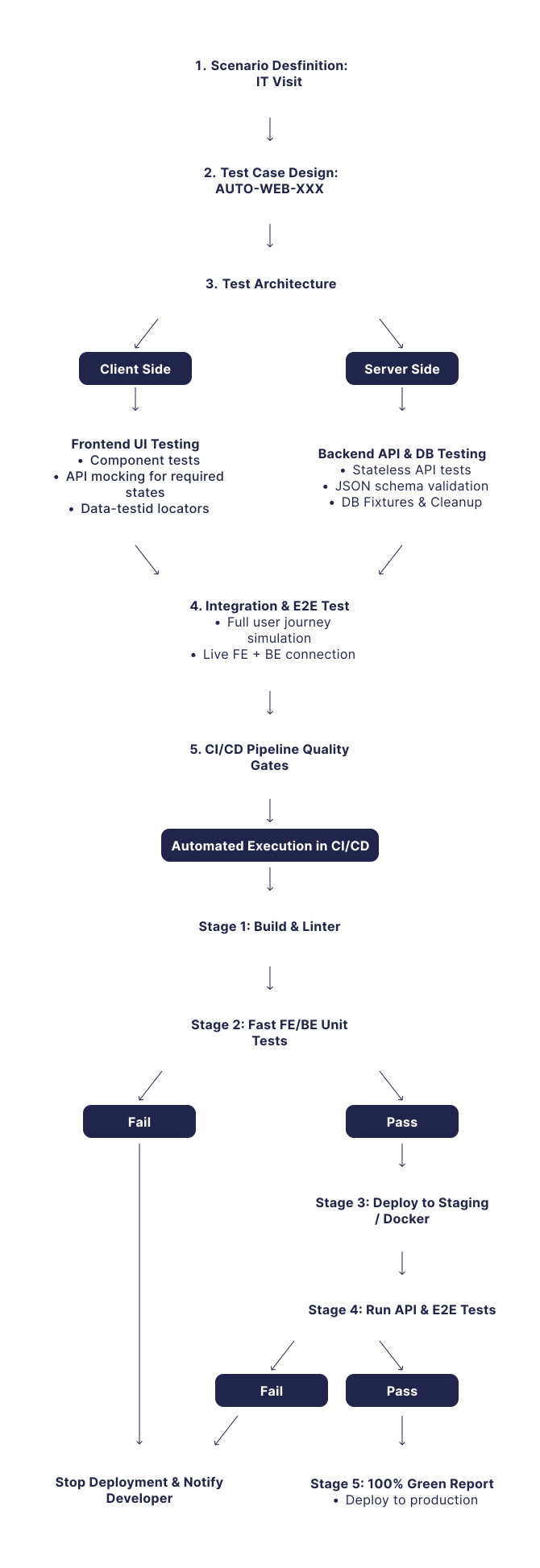
1. Test pyramid and strategy (FE vs. BE)
To make automation effective, we divide tests according to layers of architecture. This prevents the occurrence of unstable tests (flaky tests) and saves time when running them in CI/CD.
Real context: If we tested everything in such a way that the robot actually opens the Chrome browser and clicks through the website, the tests would take 2 hours. Thanks to the division into layers, we detect 90% of errors at the level of "machine" communication in a few seconds.
- Frontend (FE) Level: Focuses on isolated component (UI) testing, visual validation and client logic without direct dependence on live BE (we use mocking).
- Real example: We are testing a purely form. In the code, we "spoof" the response from the server (Mock). We are only interested in whether a red error message appears on the website after entering the wrong email.
- Backend (BE) Level: Focuses on fast and robust testing of business logic (unit tests) and correctness of API endpoints (checking JSON schemas, HTTP status codes).
- A real example: We send a data package (JSON) to the server using a tool like Postman or Mocha and check whether the server returns the correct mathematical calculation or whether it stores the data correctly in the database, without even needing to see the graphics of the website.
- Integration & E2E (End-to-End): Combines FE and BE together. It simulates a real IT visit (e.g. API calls from the frontend, writing to the database, third-party verification).
- A real-life example: Our test bot turns on a real browser, clicks on the "Send Visit" button, waits for the connection to the real database, and verifies that the message has indeed arrived in the email.
2. Advanced automated Test Case template
| Component | Frontend (UI) Specification | Backend (API / DB) Specification |
|---|---|---|
| Test ID & Name | AUTO-FE-XXX (e.g., UI element verification) | AUTO-BE-XXX (e.g., API payload validation) |
| Prerequisites | Browser state, localStorage, authenticated user session. | Database availability, test data cleanup (Fixtures). |
| Test Steps (Act) | UI interactions (clicking, text input, menu selection). | Send HTTP requests (GET, POST), execute queue processing. |
| Expected Results | DOM tree updates, element visibility, page redirection. | HTTP status code (200, 201), valid JSON schema, successful database record creation. |
A real example from practice – How a step in a table becomes a code:
- Wrong (unstable): The test looks for a button by color or position:
Click the third button from the left.(If the graphic designer changes the layout, the test crashes). - Professional (stable): The programmer adds an invisible name tag (Test-ID) to the code. The test knows exactly where to go:
await page.getByTestId('submit-visit-btn').click();.
3. Practical example: Scenario for IT visit / Audit
Scenario: Approval of an IT visit/API access request.
| Layer | Test ID | Action | Expected Result (Assertion) |
|---|---|---|---|
| BE | AUTO-BE-102 | Send a POST request to /api/v1/it-visit with a valid JSON payload. | HTTP status 201 Created. The response contains visitId. |
| BE | AUTO-BE-103 | Execute a SELECT query in the database for the given visitId. | The record exists; the request status in the DB is set to PENDING. |
| FE | AUTO-FE-401 | Open the partner portal (API is mocked to return PENDING). | A yellow label "Pending Approval" is rendered on the screen. |
| E2E | AUTO-E2E-05 | An administrator approves the request in the UI → the system performs the backend write → API keys become immediately available to the partner in the UI. | The flow completes without mocking. At the end, the script verifies that the key generated in the UI is identical to the key in the DB. |
Real example (What it looks like technically):
In the AUTO-BE-102 step, our machine sends exactly this data packet (JSON) to the server, which is the machine equivalent of filling out a form:
JSON
{
  "visitorName": "Firma XYZ",
  "visitType": "API_AUDIT",
  "date": "2026-10-15"
}
The expected result is that the server responds with the code 201 Created (which in IT parlance means "Successfully created") and returns us the unique ID of this particular visit, for example visitId: 98765.
4. Integration into CI/CD (Continuous Integration / Continuous Deployment)
Automated tests only make sense if they run autonomously every time the code changes. Our CI/CD pipeline (e.g. GitLab CI, GitHub Actions) is divided into Stages, which act as "Quality Gates". If any stage fails, the deployment to production stops.
Real context: CI/CD is actually a production line for our software. The developer uploads a new edit (e.g. changes the color of the header on the website) and this line starts itself. It doesn't need any person to turn on the tests.
CI/CD Pipeline phases for FE and BE:
- Build Stage:
- The code for both the Frontend and the Backend is compiled.
- A linter (code quality and formatting check – monitors whether developers write code cleanly and without typos) is launched.
- Unit & Component Test Stage:
- Isolated BE unit tests and FE component tests run.
- Why here? It runs extremely fast (seconds) and immediately detects errors in syntax and basic logic. (If they broke the calculator inside the system, we can find out in 3 seconds).
- Deploy to Staging / Test Env:
- If the unit tests pass, the application is deployed to an isolated test environment (staging). Everything runs in Docker containers. (Think of a Docker container as a virtual box that runs an identical copy of our website, purely for testing purposes, without affecting real customers).
- API & E2E Test Stage:
- Against the live Staging environment, the AUTO-BE-XXX integration API tests are run, followed by the complex End-to-End tests AUTO-E2E-XXX simulating an IT visit in a real browser (headless mode = the browser actually clicks on the background of the server's memory, even though it does not render a screen for the eyes).
- Reporting & Deploy to Production:
- The test results are generated into a report (e.g. Allure Report).
- If all tests are 100% green, the pipeline automatically (or after approval) deploys the new version to production to customers.
- Real-world example of an error: If the test fails (e.g., the "Submit" button is missing from the screen), the deployment is blocked. The development team will immediately receive a notification in the company's Slack. There is a link in this report where the developer can play an automatically uploaded video of how our bot got stuck on the site and see exactly that moment of error.